

On HiiKER we feature over 140,000 official hikes viewable via the “Search” tab. On top of that we allow you to view user activities, including planned and recorded hikes on the same search map.
On the search tab, you can switch the source of the routes shown on the map, from HiiKER hikes, to Community hikes.
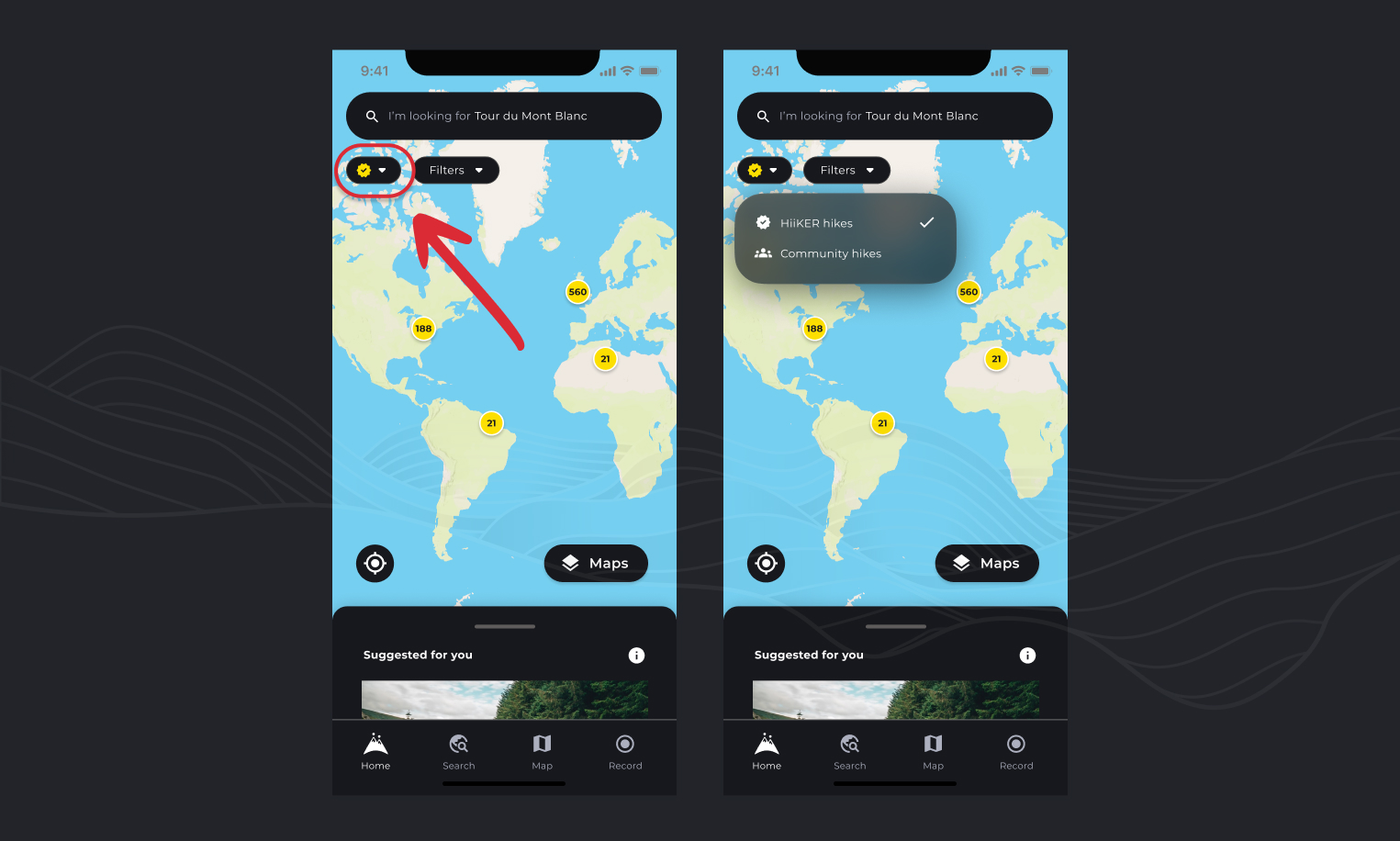
This allows you to then view community created hikes where HiiKER may not have coverage. You can further narrow down in the filters by “Type”, highlighting routes that users have plotted via the HiiKER platform (Planned Hikes), or by recordings that users have completed with the HiiKER app (Recordings).
Important Safety Notice ⚠️
Community Hikes are user-generated routes created and shared by fellow HiiKER users. While we’re excited to help you discover new trails through our community, please keep the following in mind:
These routes have not been verified by HiiKER. They may contain:
- Outdated or inaccurate information
- Seasonal hazards not reflected in the route
- Difficulty ratings that don’t match your experience level
- Navigation errors or unsafe path choices
Before setting out:
- Review the entire route carefully and cross-reference with official maps
- Check current weather and trail conditions
- Assess whether the route matches your fitness level and experience
- Download the route for offline use and carry a backup navigation method
- Let someone know your plans
You are responsible for your own safety. Always use your judgment, turn back if conditions seem unsafe, and never rely solely on any single navigation source.
