

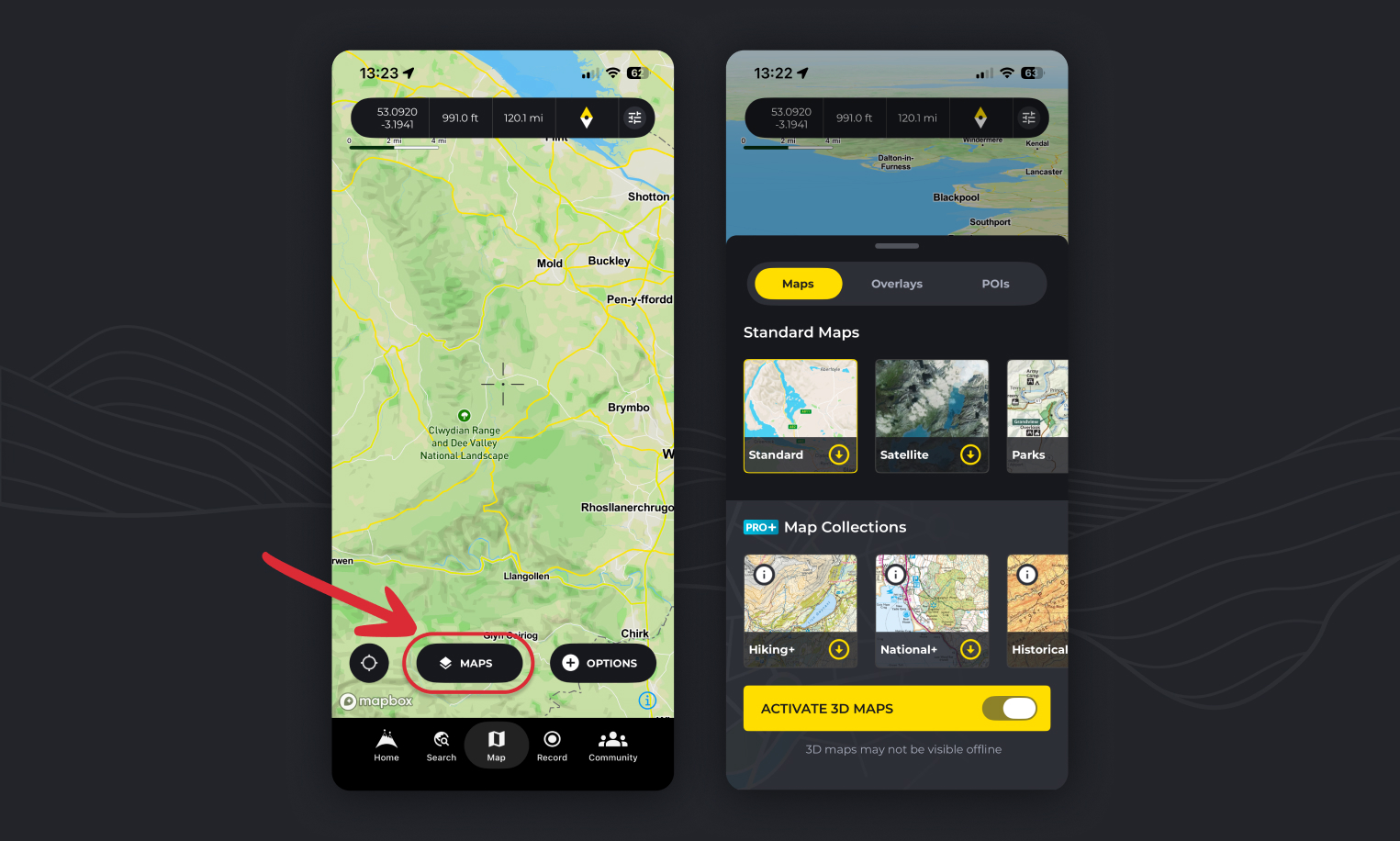
Switching map styles is easy on HiiKER, but there’s more to it than you might think!
- On any map pages on HiiKER, tap the “Maps” button to see a list of all of the maps available.
- Tap one of the options to load up the map you want to view!
Map options
Standard maps (Free to view and download):
The standard map, is a sharp and performant outdoors map overlayed with all of HiiKERs trail information (Find the dotted red lines). It’s perfect for finding new locations to hike with clearly labeled, towns, roads, peaks and woodland parks and forests!
The satellite map combines multiple sources of global satellite imagery from the likes, NASA, and USGS. Optimised for coverage and consistency, it features attractive high resolution imagery as landscapes change. Even more stunning in 3D!
The Parks map highlights national parks around the world and even features some official national parks maps.
PRO+ map options:
HiiKER map collections – Hiking+
The Hiking+ Maps collection is a treasure trove of topographical maps crafted by the world’s finest independent map designers. Selected for their intricate detail and hiker-specific information, these maps range from scales of 1:25,000 to 1:75,000, ensuring you have the most accurate guidance on your journey. From the rugged landscapes of Ireland covered by EastWest Mapping to the mountainous regions of the UK mapped by Harvey Maps, and the scenic trails of Greece by Anavasi maps, to Italy’s pathways charted by Fraternali Editore, this collection is your ultimate guide to exploring the great outdoors.
HiiKER map collections – National+
Our National+ Maps collection draws from the authoritative resources of governing ordnance and geological bodies across the globe. These maps are invaluable for hikers venturing beyond the beaten path, providing detailed topographical data and insights into a country’s natural landscape. Featured maps include the comprehensive USGS maps of the USA, the detailed Ordnance Survey maps of the UK, the extensive Vicmap of Victoria, Australia, the precise SwissTopo of Switzerland, and the renowned IGN maps of France and Spain, among others. This collection ensures that wherever you are, you’re equipped with the most reliable and official mapping available.
HiiKER map collections – Historical+
Take a step back in time with our Historical+ Maps collection, hand-picked by the HiiKER team to enrich your hiking experience by unveiling the stories of the landscapes you traverse. Whether it’s an ancient ruin or an unusual arrangement of trees, these maps offer a glimpse into the past, providing context and a deeper understanding of your surroundings. This collection is not just about navigating through space, but also time, offering a unique perspective on your hikes.

Exploring with 3D Maps
Take advantage of the 3D view to plan your hike more effectively. Identify major ascents, descents, and landmarks before you even set foot on your hike. This feature is especially useful for gauging the difficulty of the terrain and preparing for your adventure.

Downloading a map area for offline use
- Open the map options select screen (“Maps” button)
- Tap on the yellow download icons to start downloading a map area
- Choose the area you wish to download offline
- Tap the confirm download area button (If the bounds turn red, you have zoomed too far out and are over the allowed limit of area to download)
- Once started, you will see the percentage of complete, then a green check when your area is available fully offline!
For your own reassurance, you can further confirm this by checking the offline area bounds on the map itself for that map! Activate the map layer that you have downloaded and look for the dashed orange borders.
Downloading a hike map
When viewing a hike overview page, you can tap the download option, select the map you wish to download and it will automatically set the bounds for that hike so you can have the entire route available offline! Easy Peasy!
How to view ordnance Survey maps/OS Mapping on HiiKER
To find OS Mapping on HiiKER select the “National+” option. It features all of our National mapping options like OS, IGN, USGS and more.
How to view Harvey Maps on HiiKER
To view Harvey Maps, select the “Hiking+” map option. If you zoom out to a country level an orange overlay will show the coverage of Harvey Maps available. Note: Harvey Maps do not have Nationwide coverage in the UK.
How to view EastWest Mapping on HiiKER
To view EastWest Mapping, select the “Hiking+” map option. If you zoom out to a country level an orange overlay will show the coverage areas available. Note: EastWest Mapping do not have Nationwide coverage in Ireland.
How to view USGS on HiiKER
To view USGS Maps on HiiKER select the “National+” option.
How to view Purple Lizard Maps on HiiKER
To view Purple Lizard Maps, select the “Hiking+” map option. If you zoom out to a country level an orange overlay will show the coverage areas available.
How to view IGN on HiiKER
To view IGN Maps on HiiKER select the “National+” option. IGN maps have coverage in France, Belgium and Spain
How to view Kompass on HiiKER
To view Kompass Maps, select the “Hiking+” map option. Kompass maps cover Germany, Austria and parts of Northern Italy
How to view Swiss Topo maps on HiiKER
Swiss Topo Maps are available via the “National+” map option.
How to view satellite maps on HiiKER
To view high detail satellite maps on HiiKER, tap the “Maps” button on any map page and select the Satellite map option.
How to view Franternali Editori maps on HiiKER
To view Fraternali Editore, select the “Hiking+” map option. They have coverage in the North Western Border areas and alps of Italy
How to view Edizoni il Iupo maps on HiiKER
To view Edizoni il Iupo, select the “Hiking+” map option.
How to view GEO4 Maps on HiiKER
To view GEO4 Maps, select the “Hiking+” map option.
How to view LIST Maps on HiiKER
To view
