

When someone shares their Live Locator link with you, you can follow their live location as they hike. Following is free and works in the HiiKER app or in any web browser.
How to follow someone’s live location
- Open the link they sent you. If you have HiiKER it opens in the app; if not, it opens on hiiker.app in your browser.
- The map shows where they are, the track they’ve walked and the route they’re following. Their details are in the sheet at the bottom (in a browser on a computer, in the panel on the left).
- To chat, send cheers or get notifications, sign in to HiiKER. You don’t need an account just to watch.
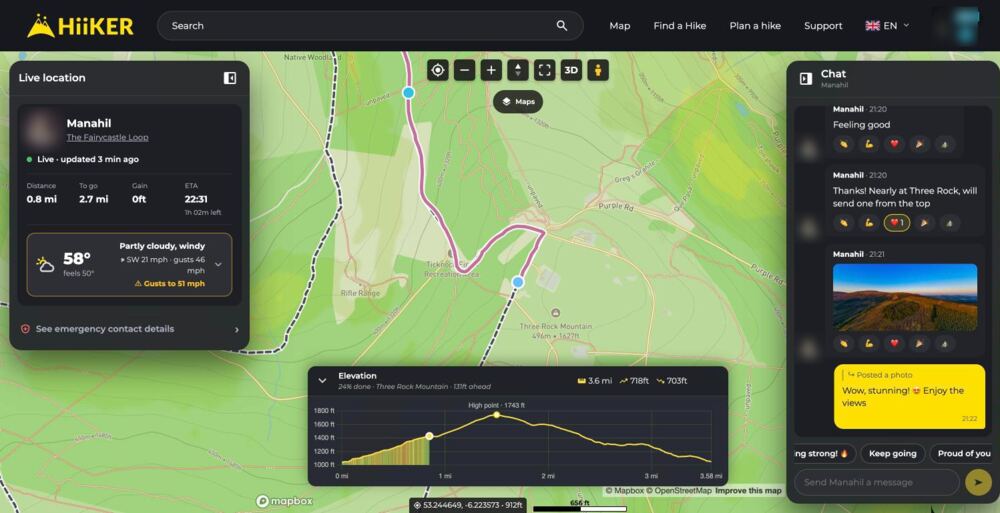
What you can see
- Status: Live · updated 12s ago, No signal · last seen 14 min ago, Waiting for the first location or Finished.
- Battery: their phone’s battery when it last sent an update.
- The hike they’re following: tap its name to open it.
- Distance, To go, Moving and ETA, with the time left under the ETA. Without a planned route you see the height they’ve climbed instead of To go. Off the planned route shows if they stray from it.
- Weather where they are: now and for the hours until they finish, sunrise and sunset, and warnings such as rain, gusts, thunder, low cloud, freezing temperatures or May finish after dark.
- Coming up (in the app): the next climbs, descents and summits on their route, with when they should get there.
- Elevation: the route’s elevation profile and how much of it is done.
- Route changes: if they switch route, you see the new one and how it compares with the old plan.


The buttons in the app
- Chat: message them and everyone else following.
- Directions: opens your maps app with directions to where they were last.
- Info: emergency details and Get emergency help.
- Links: the links on their profile. If they have none, you get Share instead, to pass the live link on.
In a browser on a computer, the chat is in its own panel on the right.
Chat and cheers
Type a message, or tap a quick reply such as Keep going, Looking strong! or I’ll meet you at the car. Press and hold a message to react with an emoji. Photos the hiker posts appear in the chat and are pinned on the map where they took them.
When they bag a peak you get a celebration with a row of cheers to send and a Say well done button.


Notifications
Once you’ve opened someone’s link while signed in, the HiiKER app notifies you when they reach a summit, change route, post a photo or an update, or finish their hike. Each share is separate: you’re only notified about shares you’ve opened yourself.
When it says No signal
No signal · last seen … ago means their phone can’t reach the internet. That’s common in valleys and on the hills. Their phone keeps recording, and the missing track fills in when it reconnects. Until then the map shows where they were last seen.
A gap of a few minutes is normal even with signal: when nobody is watching, their phone only sends an update every 5 minutes to save battery. It speeds up as soon as you open the link.
Get emergency help
If you’re worried about someone you’re following, tap Info in the app, or See emergency contact details in a browser. Get help for … gives you:
- A Call button for the emergency number that works where you are, plus the emergency numbers for the country they’re in. In Ireland and the UK, ask for Mountain Rescue.
- A rescue link: tap Copy the rescue link and send it to the rescue team. It shows their last location, grid reference, battery and planned route, and keeps updating if their phone reconnects.
- What to tell them: their last location (coordinates, grid reference and what3words), the nearest place, when they last updated, their battery and when they expected to finish.
The rescue link is only there if the hiker left Emergency sharing on. Without it you can still read out where they were last seen.

For who to call in each country, see Emergency services and Mountain Rescue. To share your own location, see Live Locator: share your live location while hiking.
