


You’ve planned the perfect hike. You’ve dropped in the highlights that matter — the hidden waterfall, the best lunch rock, the spot where the trail forks and everyone takes the wrong branch. But out on the trail, head down, music on, it’s easy to walk straight past the thing you came for.
That’s what Nearby Notifications are for. Set one on any Hike Highlight and HiiKER will give you a heads-up as you approach it — so you look up at the right moment, not five minutes too late.
What is a Nearby Notification?
A Hike Highlight is a point of interest you (or the hike’s creator) have pinned to a hike — a viewpoint, a campsite, a water source, a junction, anything worth marking. A Nearby Notification simply adds a distance to that highlight. When you get within that distance of it while you’re recording or following the route, the app lets you know.
You set the distance per highlight, so you can be as tight or as generous as you like — a gentle 1 mile warning for “start looking for the campsite turn,” or a tight 100 ft nudge for “the viewpoint is right here.”
Turning it on for a highlight
Open a Hike Highlight and tap to edit it. On the Edit Hike Highlight screen you’ll find a Nearby Notification dropdown. Choose the distance you’d like to be alerted at, then save.
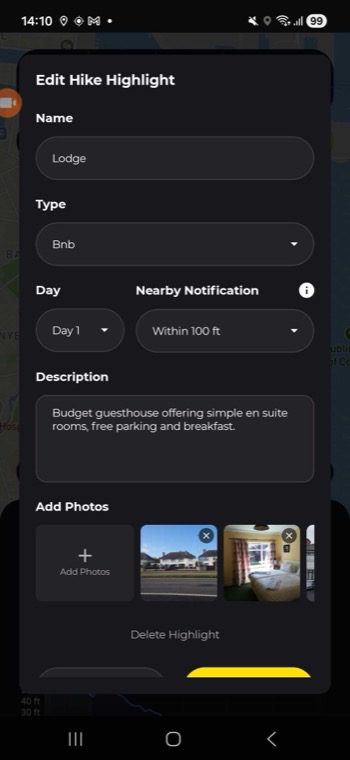
The available options are:
- Disabled — no alert (this is the default)
- Within 1 mi
- Within 500 ft
- Within 200 ft
- Within 100 ft

A note on units: these distances follow your measurement settings. If you use metric, you’ll see Within 1 km, 500 m, 200 m and 100 m instead of miles and feet. The actual trigger distance is the same either way — only the label changes. You can switch your units any time in the app’s settings.
What happens when you get close
While you’re recording or following the hike, HiiKER keeps an eye on your distance to each highlight that has a notification set. When you cross the distance you chose, two things happen:
- An Approaching Highlight alert appears in the app, showing the highlight’s name and how far ahead it is. Tap Show to jump straight to its details, or Dismiss to carry on.
- A notification arrives on your phone — for example, “You are 193 ft from Lodge” — so you’ll catch it even if your screen is locked or you’re in another app.


Each highlight alerts you once as you approach it, so you won’t get a stream of repeat buzzes if you linger nearby.
Good to know
- Location permission is required. HiiKER needs location access to know when you’re near a highlight. Recording a hike already uses your location, so notifications work hand-in-hand with it.
- Up to 20 highlights per hike can have a Nearby Notification turned on. If you hit the limit, switch one off before adding another — worth saving them for the highlights that really matter.
- It’s per-highlight. A highlight with its notification set to Disabled will sit quietly on the map as normal — only the ones you’ve given a distance will alert you.
Quick reference
- Set it: Edit a Hike Highlight → Nearby Notification → pick a distance → save
- Distances: Within 1 mi / 500 ft / 200 ft / 100 ft (or 1 km / 500 m / 200 m / 100 m on metric)
- Turn it off: Set that highlight’s Nearby Notification back to Disabled
- Limit: Up to 20 notifying highlights per hike
Set them once, then keep your head up and enjoy the walk — HiiKER will tap you on the shoulder when something good is coming up.
