

You can create printable PDF maps in HiiKER as a physical backup for your hikes.
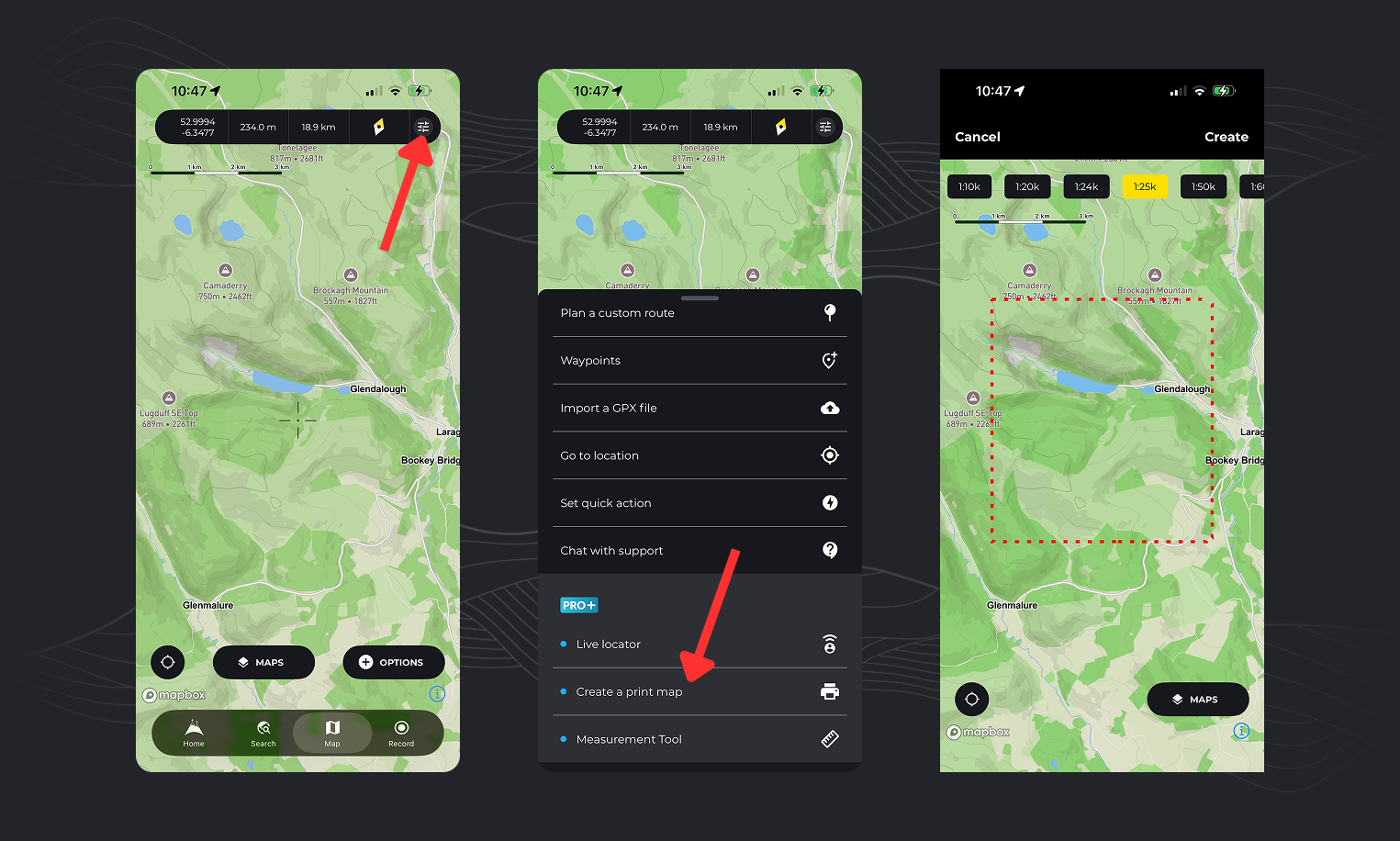
There are 2 ways to print maps from the app:
Print an area of the map:
- Open the Map tab
- Tap the Options button
- Select “Create a Print Map”
- Choose your preferred scale at the top of the screen
- Move and zoom the map to position the red dashed rectangle over the area you want to print
- Tap “Create”
- Give your print map a name
Your map will begin processing and will be available shortly in your print maps list.

Print a hike map:
- Open the hike you want to print (this can be a HiiKER hike or any planned or recorded trail)
- On the overview page, tap “More” and select “Print Map”
- If it’s a multi-day hike, choose the day or route you want to print
- The map will load in the print selector, where you can choose your scale
- Move and zoom the map to position the red dashed rectangle over the area you want to print (You can create multiple print maps for longer trails)
- Tap “Create”
- Give your print map a name
- Your map will begin processing and will be available shortly (You can refresh the print maps list to check progress)
💡 Top tip: You can also access your print maps on the HiiKER website, which may be easier for printing from a desktop.
While on the print selection screen, tap the “Maps” option and select the “National+” option.
As per our current licensing agreement with Harvey Maps, we cannot allow our users to print Harvey Maps directly from the app and website. If you want a printed version of a particular Harvey Map, we recommend supporting them by purchasing via their website: https://www.harveymaps.co.uk/
While on the print selection screen, tap the “Maps” option and select the “Satellite” option.
While on the print selection screen, tap the “Maps” option and select the “National+” option.
While on the print selection screen, tap the “Maps” option and select the “National+” option.
As per our current licensing agreement with EastWest Mapping, we cannot allow our users to print EastWest Mapping directly from the app and website. If you want a printed version of a particular EastWest Mapping, we recommend supporting them by purchasing via their website: https://eastwestmapping.ie/
You can print in A3 format from the HiiKER website.

Hi Pete, When I go to print the map which I have East west mapping layer on, it dosnt print the East west Map but just a generic one. I’m doing this on phone. Am I doing something wrong?
Thanks, James
Hi James. There’s currently no way to print EastWest mapping (or any premium mapping for that matter). We are working on this, but in the meantime, you can only print the standard OSM layer
Has there been any update to this so far in regards to printing premium maps? Also, I don’t see an option to print a map from the webpage only the app gives me the option.