

The Public Access overlay shows land you can walk on, on top of any map. It covers the United States — public and protected land, colour-coded by access type — and England, where it shows open access land under the Countryside and Rights of Way Act 2000 (the CRoW Act). It’s free for everyone.
In this article: Turn it on · What the colours mean · United States · England · Updates and accuracy · Which countries?
How to turn it on
On iPhone and Android
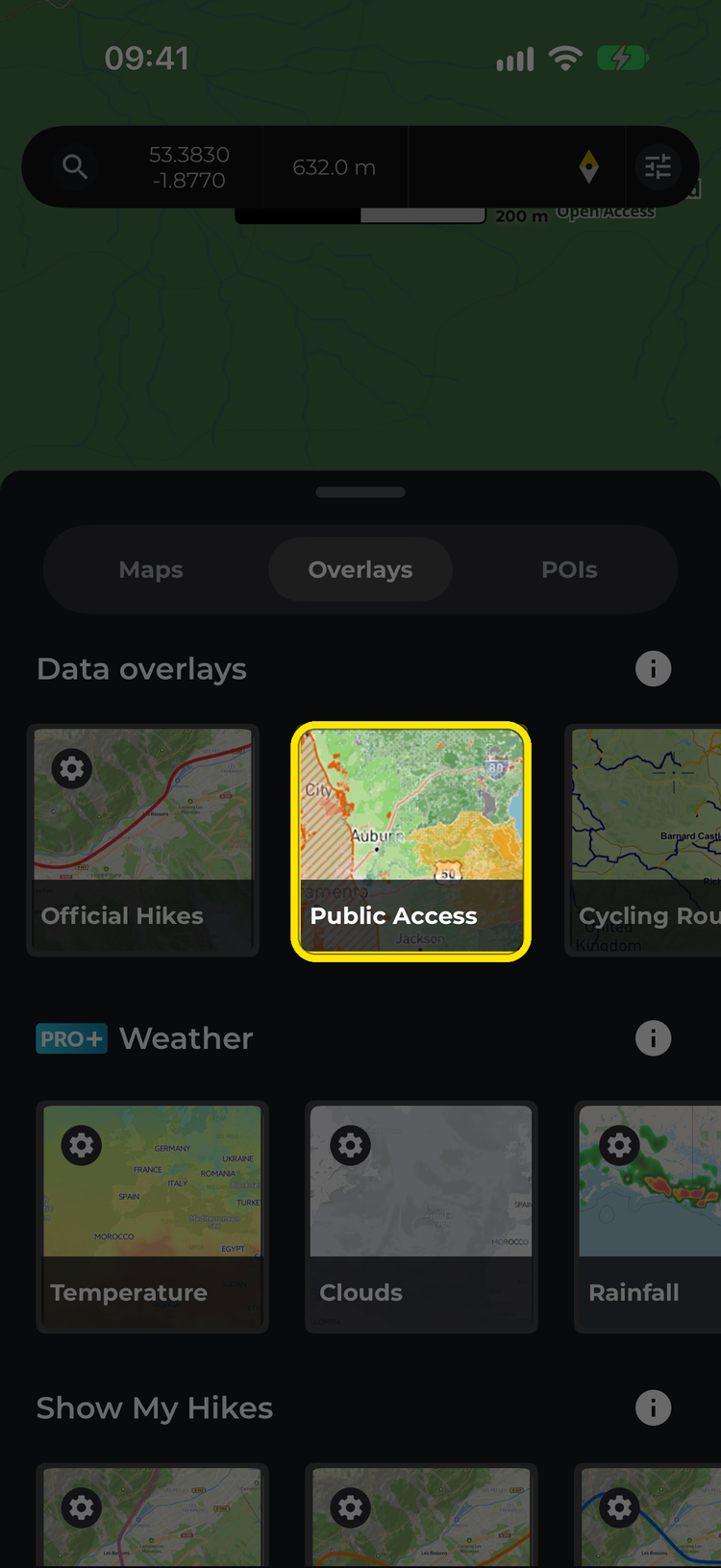
- On any map, tap Maps and switch to the Overlays tab.
- Under Data overlays (Data Overlays on Android), tap Public Access.
- Close the Maps window. A small legend appears on the left of the map — tap it to see what each colour means. Tap any shaded area to see its details.

On the website
On the website, click Maps > Overlays > Public Access. The Public land Access legend appears on the map — click a category to hide or show it — and you can click any area for its details.

In the app, Public Access can’t be shown at the same time as a weather overlay — turning one on switches the other off.
What do the access categories mean?
- Open Access — Free, unrestricted public access with no known barriers to entry.
- Entry Fee — An entrance or parking fee is required. The fee amount is shown where known.
- Permit Required — You need an advance permit, reservation or booking before visiting. A link to the permit source is provided where available.
- Limited Access — Trails or access routes exist, but conditions apply. This may include seasonal restrictions, zonal closures or managed access programmes. Check the area details for specifics.
- Restricted — Access is significantly limited. Entry may require special authorisation or guided tours, or be confined to specific areas or times.
- Closed — No public access is permitted. This includes military installations, critical habitat preserves and permanently closed areas.
- Unknown — Access status could not be determined from available data. Treat these areas with caution and verify locally before visiting.
- Seasonal areas (striped) — access changes through the year. Open and close dates are shown where known.
- Hunting areas (orange hatching) — land identified as hunting or game land.
In the United States
The US layer is built from the USGS Protected Areas Database of the United States (PAD-US 4.1), the most comprehensive inventory of protected land in the country. We enrich it with data from the National Park Service API, Recreation.gov, the U.S. Forest Service and the Bureau of Land Management to fill in details like fees, permits and seasonal opening dates. It covers all 50 states, Washington, DC and US territories such as Puerto Rico and Guam.
What does GAP Status mean?
GAP Status is a conservation measure assigned by the USGS that indicates the level of protection a piece of land receives. It ranges from 1 (highest protection, managed for biodiversity) to 4 (no known mandate for protection). We translate GAP Status into our hiker-friendly access categories, but the original GAP code is available in the area detail view for anyone who wants it.
Why does an area show a different access type than I expected?
In the US, our access classifications are derived from the GAP Status codes in the PAD-US dataset, supplemented by NPS, USFS, BLM and Recreation.gov data. There are several reasons a classification might not match your experience on the ground.
Data lag. Access rules change — a park may introduce or drop a fee, a seasonal closure may shift dates, or a new permit system may be introduced. Our data reflects the most recent PAD-US release and API queries, but real-world changes can outpace the update cycle.
Boundary precision. The boundaries shown are derived from federal and state GIS datasets. They are accurate at a planning level but should not be used for precise legal boundary determination. In some cases, boundaries may appear to overlap with private land or neighbouring jurisdictions due to mapping generalisation.
Overlapping designations. A single piece of land can have multiple designations in PAD-US — for example, a national forest may contain a designated wilderness area with stricter access rules. Where designations overlap, we prioritise the more restrictive classification so you’re aware of potential limitations.
Seasonal variation. Some areas are marked as seasonal because their access changes throughout the year (e.g. snow closures, wildlife nesting seasons). The open/close dates shown are approximate and based on the most recently available data. Always confirm current conditions with the managing agency.
Hunting areas. Areas identified as hunting or game lands are flagged with an orange overlay. Hunting seasons, species and regulations vary by state and zone. This layer does not replace state wildlife agency guidance.
Why are some areas missing?
PAD-US is the most complete dataset available, but it does not cover every piece of accessible land in the country. Private land trusts, informal access agreements, county parks not yet reported to USGS, and tribal lands with public access programmes may not appear. We’re working to improve coverage over time.
In England
In England, the overlay shows open access land from Natural England’s CRoW Act 2000 access layer — mountain, moor, heath, down and registered common land where you have a right to walk, run and climb without sticking to paths. These areas show as Open Access. Tap one and its details remind you of the rules: landowners can close access land for up to 28 days a year, and dogs must be on a short lead near livestock and from 1 March to 31 July. The Official info link opens GOV.UK’s guide to open access land.
Wales, Scotland, Northern Ireland and other countries aren’t covered yet.
Updates and accuracy
How often is the data updated?
We aim to refresh the dataset quarterly. The date shown in the “last updated” field on each area reflects when our pipeline last processed the data. PAD-US itself is typically updated annually by the USGS.
Can I rely on this for navigation or legal boundary information?
No. This layer is an informational planning tool, not a legal survey. Boundaries are approximate. Always verify access permissions, current conditions and property boundaries with the local land management agency before your visit. Trespassing on private or restricted land is a legal offence regardless of what any map shows.
I think the data is wrong for a specific area. What should I do?
We appreciate corrections. If you notice an area where the access type, boundary or details seem incorrect, please contact us at [email protected] with the area name and what you believe is inaccurate. We’ll investigate and update the data in our next refresh cycle.
Which countries does it cover?
The United States and England — Wales, Scotland, Northern Ireland and other countries aren’t covered yet. We’re exploring options for expanding to other countries in the future.
Related: HiiKER map overlays: the full list · How to change maps on HiiKER
