

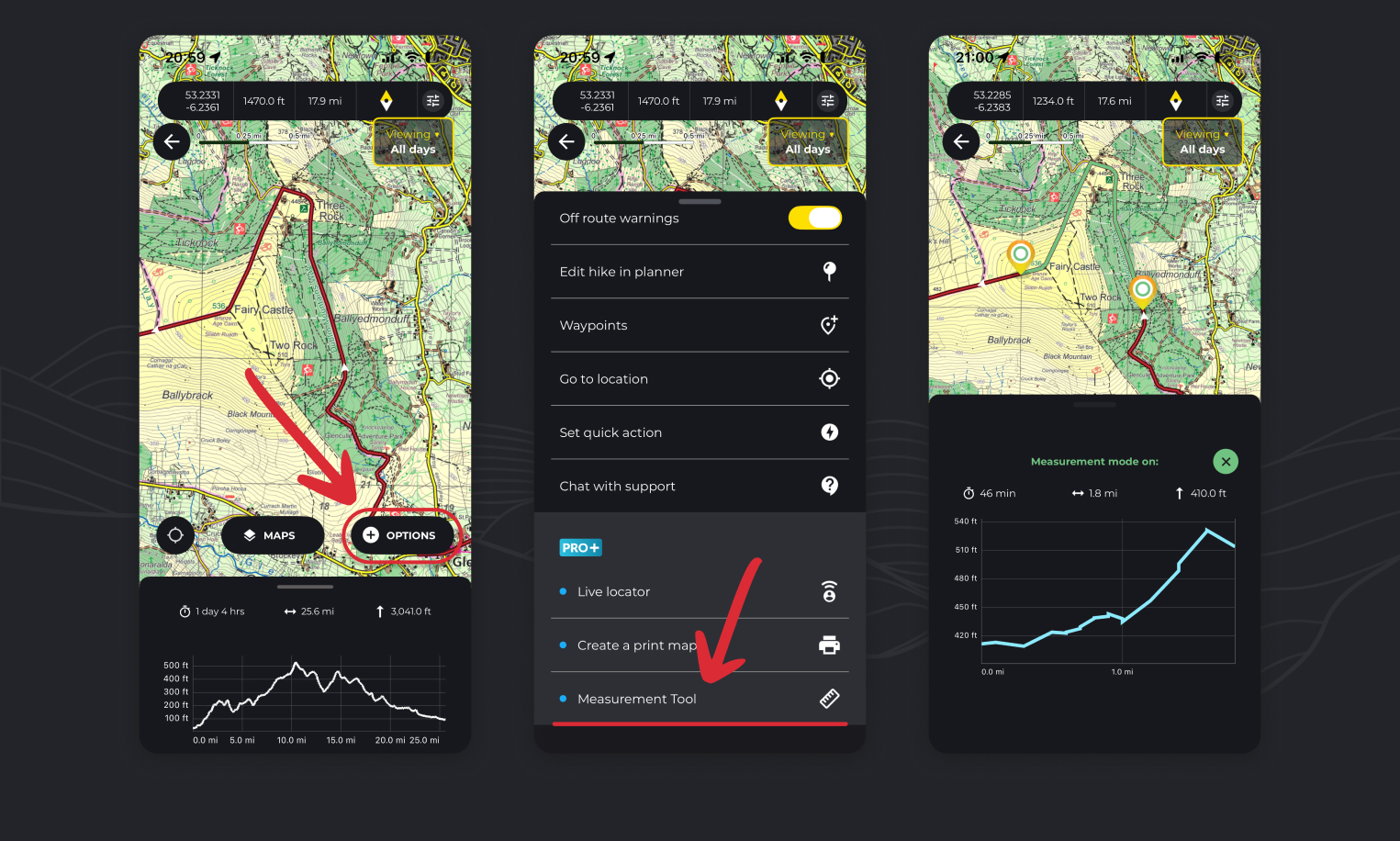
The HiiKER Measurement tool is a handy way to measure short distances or sections of a route to determine distance, elevation and estimated hike time.
Measuring a hike section
- Open a hike map.
- Tap the “Options” button
- Select the Measurement Tool option
- As instructed, place a marker at the start of the section on the route that you wish to measure and then another at the end.
- Your stats and elevation profile will appear representing this segment of the hike.
Free measuring (without route)
- Open a main map page.
- Tap the “Options” button
- Select the Measurement Tool option
- As instructed, place a marker at the start location and then another at the end.
- Your stats and elevation profile will appear representing this segment of the hike.
How to measure the distance between two points on a trail on HiiKER
As above. While viewing a trail map, tap Options > Measurement tool and follow the instructions on screen.
How to see the duration to hike between two points on HiiKER
When you use the measurement tool as per the instructions above, the results will show you estimated walking time, distance and elevation
How can I see how long is left on my hike
The measurement tool is a great way to quickly find out how long is left on your hike
- While following a route, start the measurement tool
- Add the first point near your current location
- Add the second point at the end of the hike
- It will show you estimated walking time, distance and elevation left on your hike
