

📱 Looking to do this in the HiiKER app? See How to Search on HiiKER.
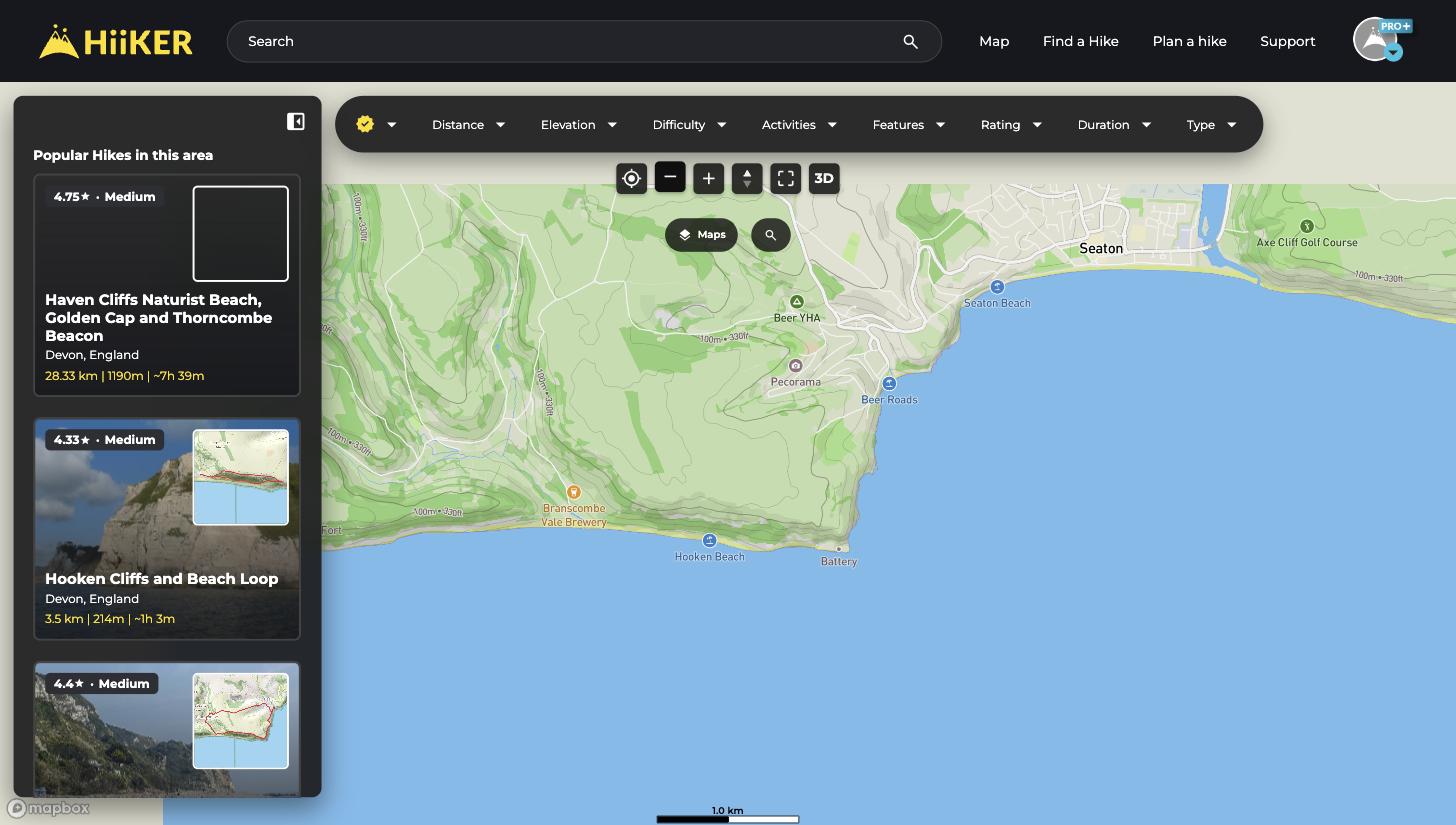
The Find a Hike page is the fastest way to discover your next adventure on the HiiKER website. It pairs an interactive map with a list of hikes in whatever area you’re looking at — move the map, and the list updates.
How to find a hike
- Click Find a Hike in the navigation bar (or go straight to hiiker.app/explore).
- Move the map to the area you want to hike — the Popular Hikes in this area list on the left updates as you go.
- Click any hike card to open its overview page, or click a yellow marker on the map to preview it.
Narrow it down with filters
The filter bar across the top lets you cut the results down to exactly the kind of hike you’re after — Distance, Elevation, Difficulty, Activities, Features (waterfalls, coastal, forests…), Rating, Duration, and Type (loop, out and back, point to point).

Official hikes vs Community hikes
By default you’re browsing Official HiiKER hikes — verified trails with full details. Click the HiiKER badge at the left of the filter bar to switch to Community hikes: routes planned and recorded by other hikers.

💡 Top tip: You can also browse hikes by country and region — for example hiiker.app/hikes/england — with ready-made lists by difficulty, feature, and activity.
