

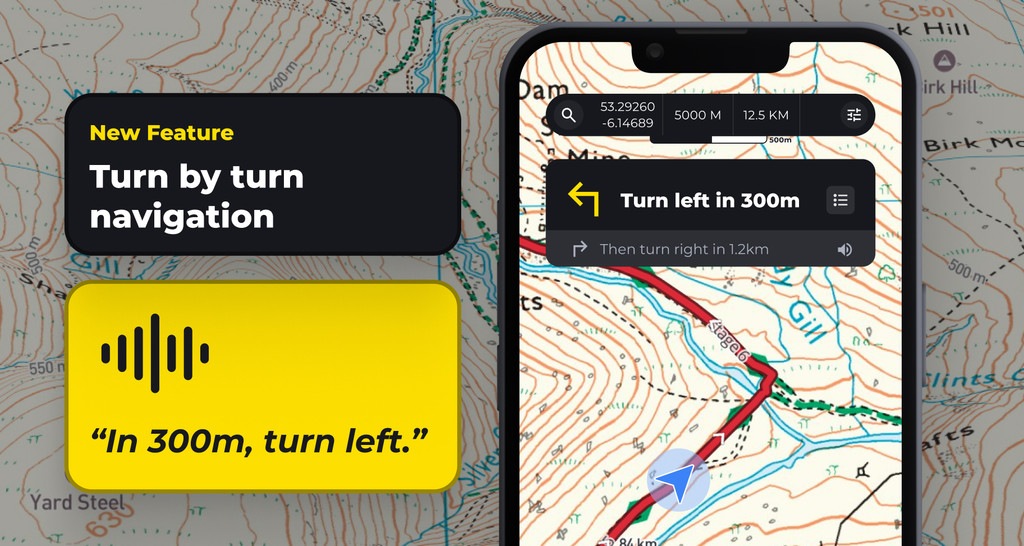
Turn-by-turn navigation gives you on-screen directions and spoken cues for each turn on your route while you record a hike.
What it does
- Shows a banner at the top of the recording screen with your next turn and how far away it is, for example “Turn left in 330 m”.
- Shows the turn after that underneath, for example “then keep right in 60 m”.
- Speaks a cue as you approach each turn. Cues keep playing with the screen off.
- Warns you out loud if you go off route.
- Shows your next turn on Apple Watch, Wear OS and the iPhone lock screen.
Requirements
- A HiiKER PRO+ subscription.
- A planned route. Turn-by-turn works on any hike or route you plan in the HiiKER app or the HiiKER web app.

How to turn it on
- Open a hike or a route you’ve planned.
- Tap the Start Navigation option. Where turn by turn navigation is available, it will be indicated on the “Start Navigation” button. If it is not present on the “Start Navigation” button, turn by turn instructions are not available for this hike.
- Turn by turn navigation should start as soon as you press “Start”
If you start away from the route, HiiKER can give you directions to the trailhead first.
Additional options
- Deactivate turn by turn instructions
- While recording a hike, tap Options on the map.
- Switch off the Turn by turn navigation toggle.
- While this toggle is “off”, turn-by-turn navigation will not show for ANY hike, and will need to be reactivated on your next hike.
- Mute voice cues: Tap the speaker icon on the turn-by-turn banner to mute voice cues. Tap it again to turn the cues back on.
- Hide the banner: Tap Hide to shrink the banner and see more of the map.
- See all directions: Tap the list icon on the banner to see every turn on the route on a map.
- Edit an instruction: When planning a route, open the directions list and tap an instruction to change its wording or delete it.
- Add your own prompt: When planning a route, tap a point on the route and choose Add turn-by-turn prompt. Pick a type, such as Turn left or General info, and add your own text, for example “Cross the stile by the old gate”.


Good to know
- If HiiKER can’t build directions for a segment of the route, the banner shows Follow the map with the distance, and you’ll hear “Turn by turn not available for the next 50 m. Please refer to the map.” You can still follow the route line on the map.
- Turn-by-turn works alongside off-route warnings. You can use both at the same time.
