

When you create a hike on HiiKER, it starts out as your own personal route. If you’d like other hikers to be able to discover it in search, you can submit it to the HiiKER Hike Team to be reviewed and made official. Approved hikes are credited to you as the creator.
This article walks through how to submit a hike from both the mobile app and the web, what happens during review, and how you’ll be notified of the outcome.
Submitting a hike on the mobile app
At the end of the hike creation flow, you’ll reach the Set privacy for this hike step. Here you can choose whether the hike should be Private or Public, and — underneath — whether to submit it to HiiKER for review.
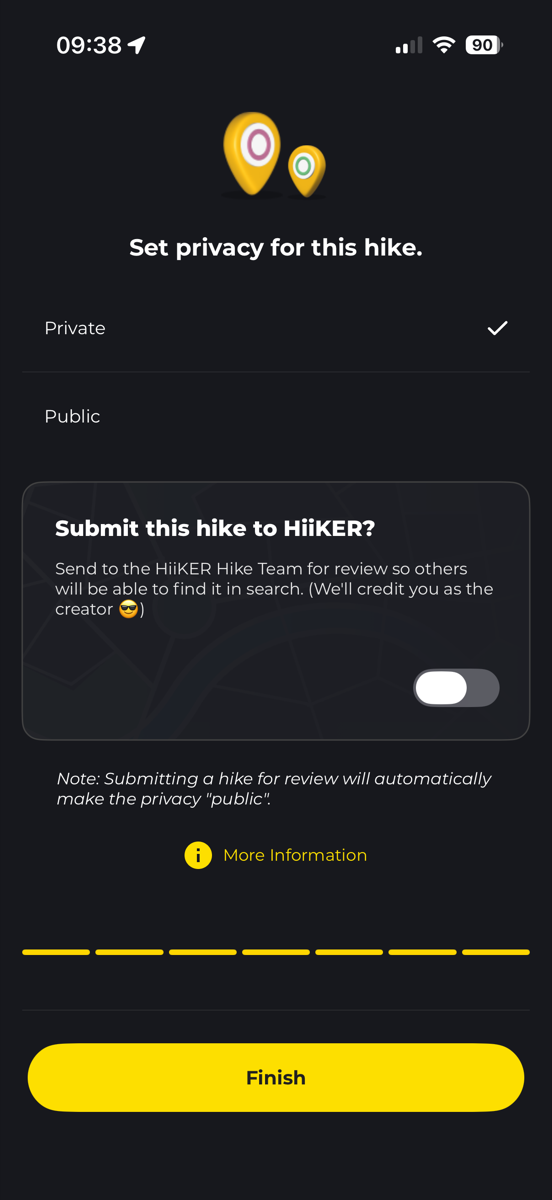
To submit the hike:
- Toggle Submit this hike to HiiKER? on.
- Tap Finish.
A few things to note:
- Submitting a hike for review will automatically set its privacy to Public.
- The hike is sent to the HiiKER Hike Team for review so others will be able to find it in search.
- We’ll credit you as the creator if it’s approved.
Submitting a hike on the web
On the web app, you’ll find the same options in the hike’s save panel, alongside activity and feature tags.

- Set Who can view to Everyone can view.
- Turn on the Submit this hike to be made official toggle.
- Click Save.
Your hike will then be sent to the HiiKER Hike Team for review, the same way it would be from the mobile app.
What happens after you submit
Once a hike has been submitted, the HiiKER Hike Team will review it. We check things like the route itself, the name and description, and whether it duplicates an existing hike.
You’ll hear back from us in two ways:
- A push notification on your device, and
- An email to the address on your HiiKER account.
The outcome will be one of:
- Accepted — your hike is now official and discoverable in HiiKER search, credited to you as the creator.
- Rejected — the notification and email will include a reason so you know what to change. You’re welcome to adjust the hike and submit it again.
Tips for getting your hike approved
A few things that make approval smoother:
- Give the hike a clear, descriptive name (avoid things like “My Walk” or “Test”).
- Make sure the route actually follows walkable trails or paths.
- Add a short description of what makes the hike worth doing.
- Avoid submitting duplicates of hikes that already exist on HiiKER.
If your hike is rejected, don’t worry — the rejection reason is there to help you fix it, and you can resubmit once it’s updated.
