

Your Hike time settings tell HiiKER how fast you walk, so every estimated time in the app and on the website is based on your pace rather than an average stranger’s.
In this article: How the estimate works · What the presets mean · Your own units · Hike days or hours · Good to know · Change it in the app · Change it on the web
What the two numbers actually do
- Distance pace — your walking speed on flat ground.
- Elevation pace — how much ascent you climb in an hour.
HiiKER adds the two together: the time to cover the distance, plus extra time for the climbing. On Average (5 km/h · 600 m/h), a 12 km route with 600 m of ascent works out as 2 h 24 m for the distance plus 1 h for the climb, so 3 h 24 m in total.
That’s why two routes of the same length can show very different times: the hillier one has more ascent to pay for.
What the presets mean
- Slow — 3 km/h, climbing 400 m per hour
- Average — 5 km/h, climbing 600 m per hour (the default)
- Fast — 7 km/h, climbing 800 m per hour
- Trail Runner — 10 km/h, climbing 1,100 m per hour
Tap Advanced… and you can mix and match instead: a distance pace anywhere from 2 to 10 km/h, and an elevation pace from 300 to 1,100 m per hour. Useful if you cover flat ground quickly but take climbs steadily, or the other way round.
Times and paces use your own units
Hike times and paces are always shown in the measurement units you’ve chosen. Set units to Miles/Feet and the presets read in mi/h and ft/h; set them to Kilometres/Metres and you’ll see km/h and m/h. Change them in the app at App Settings > Customize > Measurement Units, or on the web under My Account Settings.
Hike days or hours and minutes
By default, longer estimates are shown in hike days, where 1 hike day = 5 hours of walking. If you’d rather see plain hours and minutes, change Estimated hike time from Convert to hike days to Show in hours & minutes:
- On iPhone: it’s at the bottom of the Hike Time Setting screen (see the steps below).
- On Android: go to App Settings > Customize > Estimated hike time and choose Show in hours / Minutes.
- On the website: it’s in the Hike time section of My Account Settings.
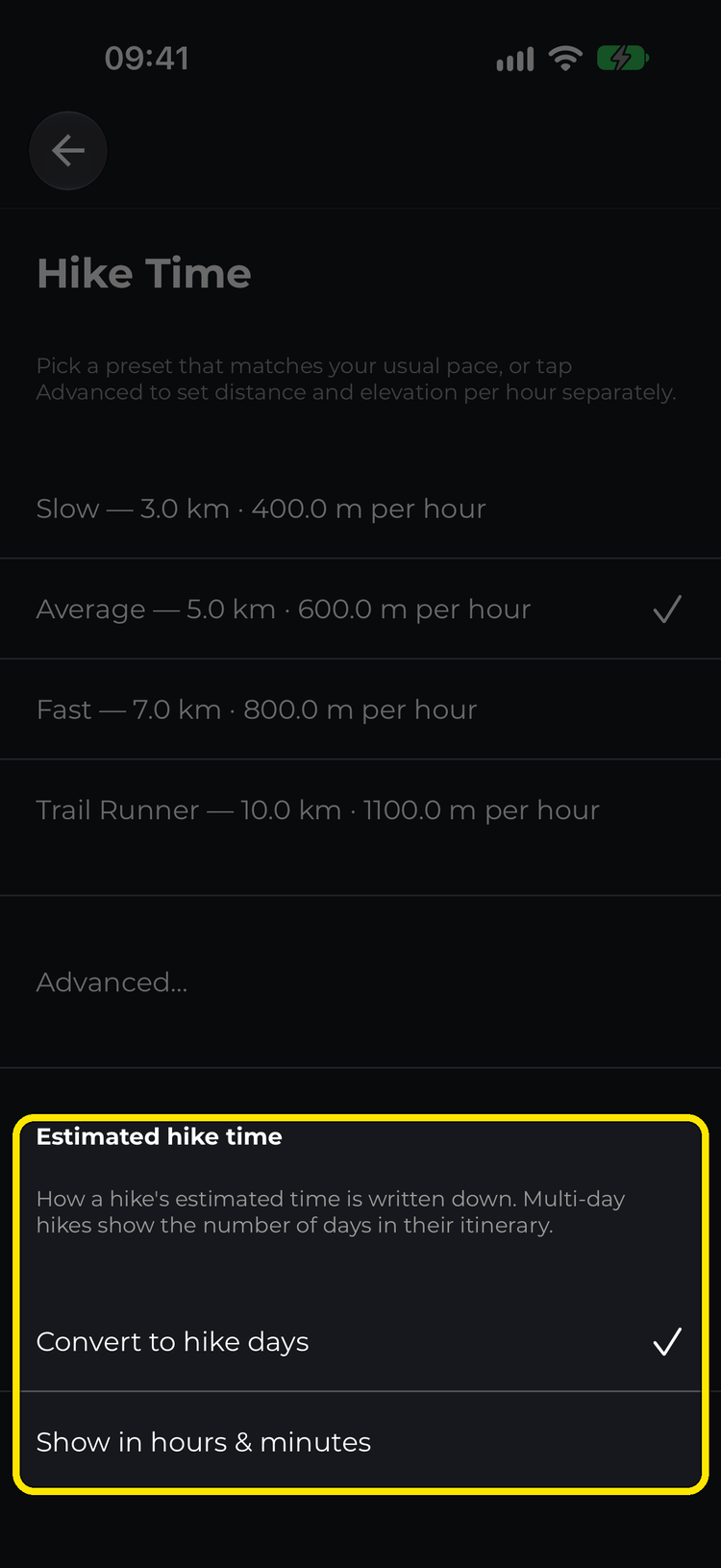
The choice is saved to your account, so it’s the same everywhere you sign in. Multi-day hikes always show the number of days in their itinerary, whichever you pick.
Good to know
- Your pace is saved to your HiiKER account, so it follows you across your phone, tablet and the web.
- Estimates assume continuous walking. They don’t include stops for lunch, photos or a sit down at the summit.
- Ascent is factored in; steep descent isn’t (yet).
- The estimates are built for walking, so there’s no cycling mode: 10 km/h is the fastest pace available.
Change your pace in the app (iPhone and Android)
- Go to the Home page and tap the settings icon.
- Select App Settings > Customize > Hike Time Setting.
- Tap a preset: Slow, Average, Fast or Trail Runner.
- Or tap Advanced… to set your distance pace and elevation pace separately.
- On iPhone, scroll down to Estimated hike time to choose between hike days and hours and minutes. (On Android this is its own entry in the Customize menu.)
- Tap back. Estimated times across the app update straight away.


Shortcut: type hike time into the app’s search bar to jump straight to this setting.
Change it on the web
- Go to hiiker.app and open My Account Settings from your profile sidebar.
- Under Hike time, choose a preset, or click Advanced… for the two separate pickers.
- In the same section, use Estimated hike time to choose hike days or hours and minutes.
Your changes are saved automatically.
Looking for the rest of the options? See Customise the HiiKER app.
