

Every peak list in HiiKER has its own leaderboard. It ranks walkers by how many of that list’s summits they’ve bagged in the last 60 days, so it’s a board anyone who’s out walking can climb, not a lifetime total that nobody new can catch.
How the ranking works
- Only the last 60 days count. A peak bagged earlier than that no longer adds to your total here, and if you go 60 days without bagging a peak from the list you drop off the board. Your lifetime totals aren’t affected; they live on My Peaks.
- Each summit counts once, however many times you walk over it.
- Only peaks bagged on a recorded hike count, the same as everywhere else in peak bagging. See How peak bagging works in HiiKER.
- Level on peaks? Whoever bagged a peak most recently takes the higher place.
What you’ll see
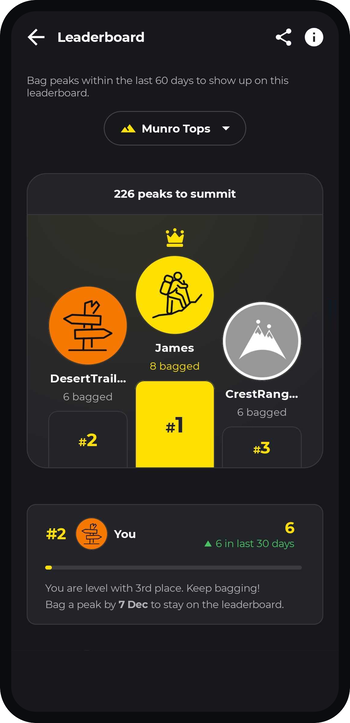
- The top three on a podium, each with the number of peaks they’ve bagged in the last 60 days. The strip above the podium tells you how many peaks are on the list.
- Everyone else in a ranked list below.
- Your own card, with your position, your 60-day total, how many of those you bagged in the last 30 days, and how many peaks you are behind a podium place, or that you’re level with one, or top of the board. It also gives you a date: bag a peak by then and you stay on the leaderboard. Tap the in last 30 days line to see every peak on the list.
- Not on it yet? Your card says so. Bag a peak from this list on a recorded hike and you’ll appear.
Tap any walker to open their profile. If nobody has bagged a peak from the list in the last 60 days the board is empty; record a hike over one of its summits and you’ll be first.
Switching lists
Tap the list name at the top to pick another leaderboard. You can search by name, and your own lists are shown first. Each list is ranked on its own, so being near the top of one says nothing about where you sit on another.
Sharing a leaderboard
Tap Share in the top bar to send a link to this leaderboard. Anyone with HiiKER who opens it lands straight on the board.
How to open a leaderboard
- Open My Peaks and tap a list. Not started one yet? See Find and join a peak list.
- Scroll to Leaderboard on the list’s page, where the top three and your own card are shown, and tap View leaderboard.
You can also open one from the Leaderboards section of any profile: tap a row to see that list’s board.
Why hasn’t my count moved?
Leaderboard positions follow your bagged peaks, so a summit has to be bagged first, and bagged within the last 60 days. If a peak you expected isn’t showing, see I climbed a peak but it didn’t count.
