

Keep your hiking organised on hiiker.app: save hikes into lists, tick off the ones you’ve walked, and watch your stats build up.
In this article: Hike lists · Completed hikes · My Stats · Good to know
Hike lists
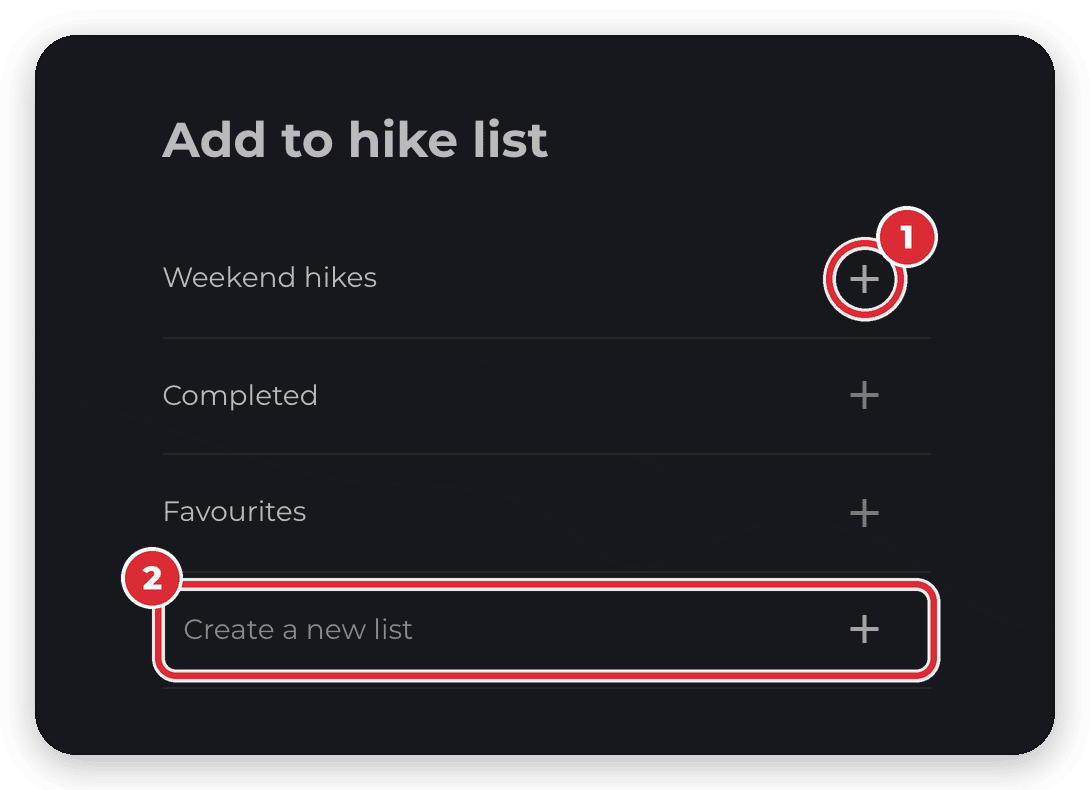
- On any hike page, click Add to list.
- In the Add to hike list window, click + next to a list to add the hike to it. To start a new list, type a name into Create a new list and click +.
- Find all your lists under My Hike Lists in your profile sidebar.
Every account has two lists that HiiKER keeps for you, Favourites and Completed, and they can’t be deleted. Lists you create yourself can be edited or deleted from the ⋮ menu on the list. Click New List to make another, and tick Make this list public if you want other people to see it — lists are private until you do. Your lists sync with the HiiKER app.

Completed hikes
Finished a trail? Log it, and it goes into your Completed list.
- Open the hike’s page and click Complete.
- In the When did you complete this hike? window, set the Completion date and click Mark as Completed.
- The button changes to Completed, the hike page shows the date you completed it, and the hike appears in your Completed list under My Hike Lists.

You can also tick a hike off by adding it to your Completed list from Add to list — it’s logged with today’s date. To undo, click Completed on the hike page, or remove the hike from your Completed list.
Looking for the old Completed Hikes page in your profile? Your completed hikes now live in the Completed list under My Hike Lists.
My Stats
My Stats, in your profile sidebar, adds up your recordings: total distance hiked, hikes recorded, time recorded, total elevation, average distance per hike, active days and completed hikes. Below that you’ll find milestones, your last 12 months month by month, personal bests and a year-by-year table.
Your stats come from your recordings — hikes you record with the HiiKER app, plus any you import or sync from Garmin. Haven’t recorded anything yet? The page shows Get the app so you can get started.

Other people can see a Stats page on your public profile. It counts only your public recordings and the public hikes you’ve completed — see Your public profile and privacy on HiiKER.
Good to know
- Hikes you’ve completed are hidden from My Planned Hikes by default. To show them, open the More filter and untick Hide completed.
- When you save a recording that’s linked to a hike — for example, one you followed in the app — that hike is marked as completed automatically, dated the day you recorded it.
Related: How to create a hike list on HiiKER · Recordings on the HiiKER website · Your public profile and privacy on HiiKER
