

Looking to do this in the HiiKER app? See Printing maps in the HiiKER app.
With PRO+ you can turn any part of the map into a printable PDF — a paper backup that never runs out of battery. The print builder is at hiiker.app/print-maps.
In this article: Build a print map · Print a whole hike · Advanced settings · Which maps you can print · Your print maps · Good to know
Build a print map
- Open hiiker.app/print-maps. From the main map you can also use Options > Print hike map, or Maps > More > Print a map — the builder opens on the area you were looking at.
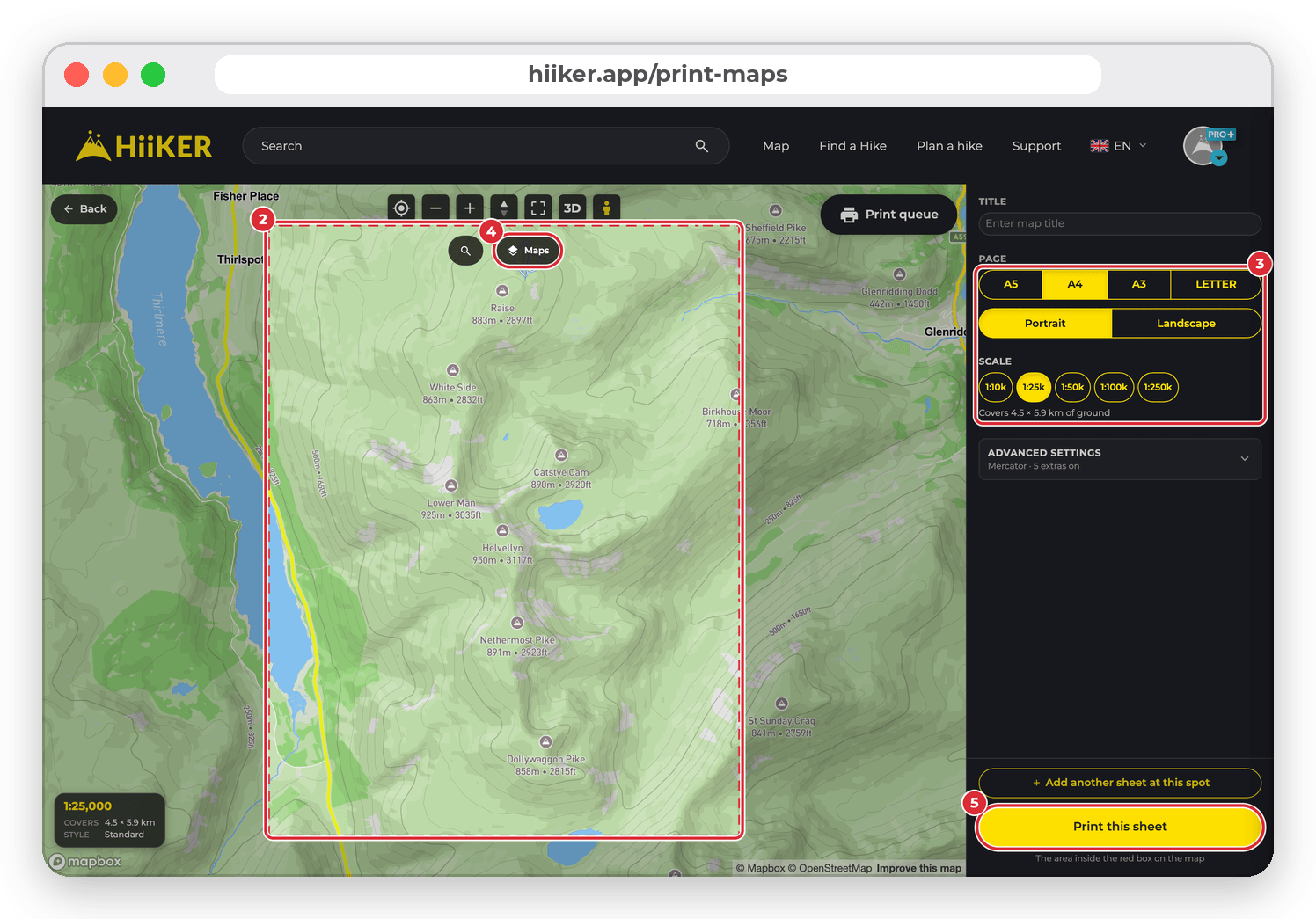
- Move the map until the area you want sits inside the red box. Everything inside the box is what prints.
- Pick a Page size (A5, A4, A3 or Letter), Portrait or Landscape, and a Scale from 1:10k to 1:250k. The line underneath tells you how much ground one sheet covers, for example “Covers 4.5 × 5.9 km of ground”.
- Choose your map style with Maps above the map. Your sheets print in whichever style is on screen.
- Add a Title if you like, then click Print this sheet.
Need more than one sheet? Frame the first one and click Add another sheet at this spot — it goes into a Sheets to print list. Move the map, add the next sheet the same way, and when you’re done click Print 2 sheets as one PDF (the number matches your list). The whole set comes out as a single PDF.
Print a whole hike
Open a hike or one of your recordings and choose More > Print Map. The builder opens with the route already on the map, plus a few extra choices:
- When you print every day or the whole route, Fit to the walk picks the scale for you and Fixed scale keeps the scale you choose. With a fixed scale, the panel tells you if some days won’t fit on one sheet.
- What to print — Every day (multi-day hikes: one sheet per day, framed on that day’s walk), Whole route (the full walk on as few sheets as it takes) or This map area (frame it yourself).
- The print button changes to match — for example Print all 8 days or Print the whole route. Either way you get one PDF.
- Customise route style changes the colour, thickness and opacity of the route line. It applies to the printed sheet, the hike map and the HiiKER app.

Advanced settings
Click Advanced settings under the scale buttons to choose what goes on each sheet. The summary on the button shows how many extras are switched on.
- Grid & projection — print in Web Mercator (north up), British National Grid (OS), Irish Grid, New Zealand Map Grid or UTM (worldwide). Turn on Show grid & edge coordinates to add grid lines with coordinates around the edge of the sheet.
- Magnetic declination — adds the compass correction for the area, so bearings you take from the map match your compass.
- Scale bar and Legend — a scale bar and a key to the map symbols.
- Elevation profile, QR code to the hike and Information sheet (an extra page listing the days) — offered when you print from a hike or recording.
- Date and Sunrise & sunset — set the day you’re walking to print that day’s sunrise and sunset times.

Which maps you can print
Standard, Satellite and Parks can be printed by everyone. With PRO+ you can also print National+, Historical+ and National+ (UK 1:50k) — a version of National+ that only appears in the print builder and keeps to the 1:50,000 series. Hiking+ and Lidar are greyed out in the print builder’s Maps window — they aren’t available for printing yet.

Your print maps
Each print is made in the background. Click Print queue at the top right of the builder to watch it render and Download the PDF when it’s ready. Every PDF you make is also kept under My Print Maps in your profile sidebar, ready to download and print any time.
Good to know
- Printing is part of PRO+. You can open the builder and frame sheets without it, but you’ll be asked to upgrade when you print.
- The builder starts at A4, Portrait and 1:25k.
- If your chosen grid doesn’t cover the area, the sheet falls back to a latitude/longitude grid — the builder warns you when that happens.
- The print builder is made for a computer screen. On a phone you’ll be offered the HiiKER app instead.
Related: Printing maps in the HiiKER app · PRO+ map styles on the HiiKER website · Using the map on the HiiKER website
