

A HiiKER promo code unlocks a special offer price on PRO+. You enter it on the PRO+ upgrade screen in the app, then buy PRO+ at the offer price.
Got a gift voucher?
Codes from a HiiKER gift voucher are redeemed on the website, not in the app:
- Go to hiiker.app/redeem and log in (or create your free account).
- Enter your 8-character code and click REDEEM.
See Gifting a HiiKER subscription for more.
Redeem a promo code in the app
- Make sure you’re logged in to your HiiKER account.
- Open the PRO+ upgrade screen: on the Home tab, tap the Upgrade now card (or tap any PRO+ badge).
- Scroll down past the plans and features and tap Enter promo code.
- Type your code and tap REDEEM PROMO CODE (Android: Redeem promo code).
- When the code is accepted you’ll see Offer successfully redeemed (Android: Promo code applied.) and the upgrade screen shows your offer price. Choose your plan and complete the purchase.
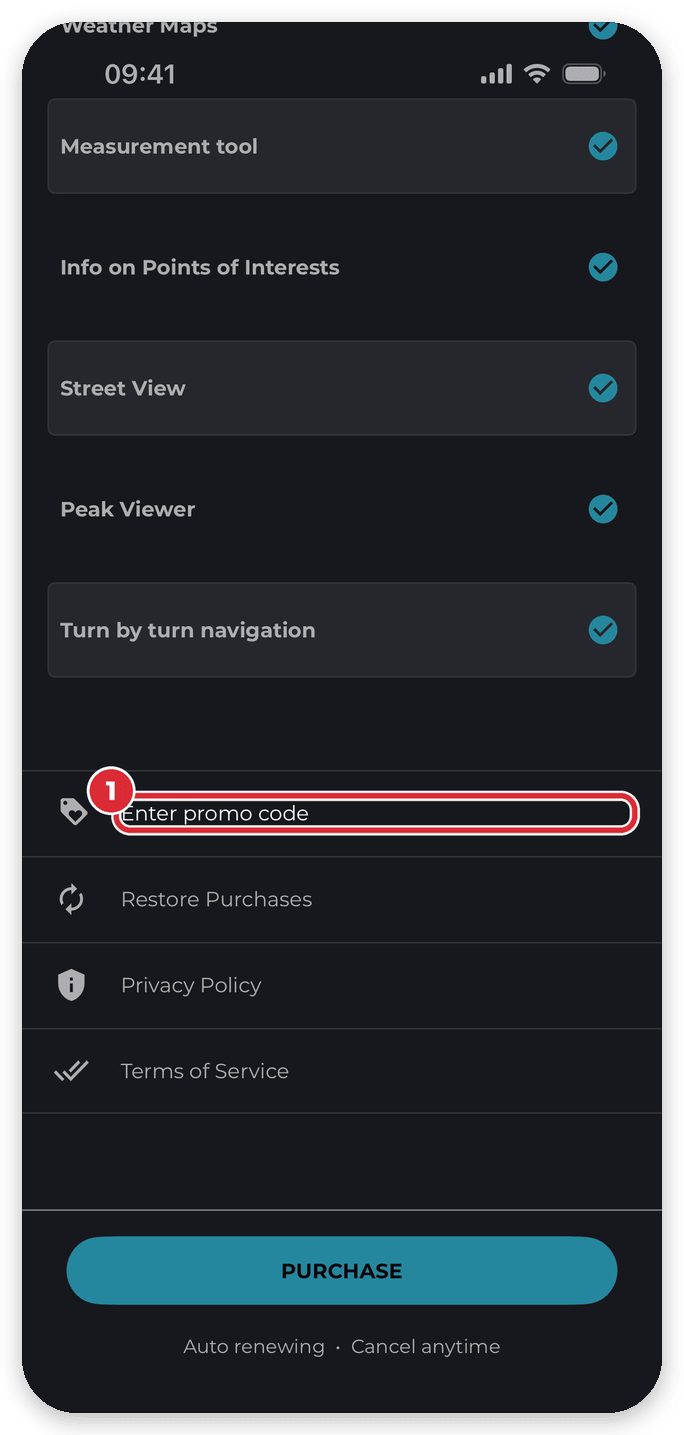

Redeem your code when you’re ready to buy, and complete the purchase straight away.
Code not working?
- Check you’ve typed the code exactly as you received it.
- If it’s a gift voucher code, use hiiker.app/redeem instead (see above).
- Still can’t redeem it? Contact HiiKER support from the app — tap Get support on the Home tab, or Chat with Support in App Settings (Android: Quick guides & support) — or email [email protected].
Related: Upgrading to PRO+ · Gifting a HiiKER subscription · Restore purchases
